
What Is a Gantt Chart? How to Use One to Plan Your Projects
If you have ever managed a project, large or small, you will know how quickly timelines can slip, tasks overlap, and priorities get lost. A Gantt chart is one of the most effective tools for keeping everything on track. Used by project managers, operations teams, and business owners around the world, it gives you a clear, visual picture of your project from start to finish.
In this guide, we will explain what a Gantt chart is, walk you through how to use one, and explore why it remains one of the most popular project planning methods available. Whether you are planning a product launch, a construction project, or an internal team initiative, understanding Gantt charts will help you plan smarter and deliver on time.
What Is a Gantt Chart?
A Gantt chart is a type of horizontal bar chart used to plan and schedule projects. It displays tasks or activities along a vertical axis, with time running across the horizontal axis. Each task is represented as a bar that spans the duration of that activity, making it easy to see at a glance what needs to happen and when.
The chart was developed in the early 20th century by Henry Gantt, an American engineer and management consultant. Since then, it has become a cornerstone of project management across virtually every industry, from construction and software development to marketing and event planning.
Key components of a Gantt chart
Tasks: a list of activities or deliverables that make up the project.
Timeline: the horizontal axis, usually measured in days, weeks, or months.
Bars: horizontal blocks representing the start date, duration, and end date of each task.
Dependencies: arrows or links showing which tasks rely on others being completed first.
Milestones: key dates or checkpoints within the project, often shown as diamond shapes.
Assignees: the team members or departments responsible for each task.
Example: A simple Gantt chart layout
The table below illustrates how an eight-week project might be visualised in a Gantt chart. Each coloured block represents the period during which that task is active.

This kind of visual overview makes it immediately clear which tasks overlap, which tasks are sequential, and where the project's critical path lies.
How to Use a Gantt Chart for Project Planning
Creating and using a Gantt chart effectively involves more than simply listing tasks and drawing bars. Here is a step-by-step approach to getting the most from this tool.
Step 1: Define the project scope
Before building your chart, clearly outline what the project needs to achieve. Identify the final deliverable, the key stakeholders, and any constraints such as budget or hard deadlines. A clear scope prevents scope creep later and ensures your chart reflects what the project actually requires.
Step 2: Break the project into tasks
Divide the project into manageable tasks or work packages. Be specific enough that each task has a clear output and a responsible person, but not so granular that the chart becomes unmanageable. A good rule of thumb is that tasks should take between one day and two weeks to complete.
Step 3: Identify dependencies
Some tasks cannot begin until others are finished. For example, you cannot begin testing a product before development is complete. Mapping these dependencies prevents bottlenecks and helps you sequence your work logically. Most project management tools allow you to link tasks with dependency lines.
Step 4: Assign durations and dates
Estimate how long each task will take and assign start and end dates. Be realistic, taking into account team capacity, holidays, and external factors. Overly optimistic timelines are one of the most common causes of project delays.
Step 5: Assign team members
Allocate each task to a specific person or team. This adds accountability and makes it easy to spot when one individual is overloaded with work. A good Gantt chart tool will allow you to filter tasks by assignee so each team member can see their own workload.
Step 6: Monitor and update regularly
A Gantt chart is only useful if it stays up to date. Review it at least once a week, marking tasks as complete, adjusting dates where needed, and flagging any risks or blockers. Treat it as a living document, not a one-time exercise.
Why Is a Gantt Chart Useful for Businesses?
Gantt charts have endured for over a century because they solve a problem that every team faces: how do you communicate a complex plan simply and clearly? Here are the key reasons businesses continue to rely on them.
Complete visibility of the project timeline
A Gantt chart gives everyone, from the project manager to a senior director, an immediate overview of the full project. You can see which phase you are in, what is coming up next, and how close you are to the finish line. This clarity reduces the need for lengthy status meetings and constant progress chasing.
Easier identification of the critical path
The critical path is the sequence of tasks that directly determines the project's end date. Any delay to a task on the critical path will delay the whole project. A Gantt chart makes the critical path visible, allowing project managers to focus attention where it matters most and make informed decisions when priorities shift.
Better resource management
When you can see every task laid out over time, it becomes far easier to identify periods where team members are overloaded and periods where they have spare capacity. This helps managers allocate resources more evenly, avoid burnout, and plan ahead for busy periods.
Improved communication across teams
A visual chart is far easier to communicate than a spreadsheet full of dates and notes. Gantt charts work well in client meetings, board presentations, and team briefings because they tell the story of the project at a glance. Stakeholders who are not involved in the day-to-day work can still follow progress without needing detailed explanations.
Proactive risk management
By mapping out the full timeline in advance, you can identify potential problems before they occur. If two resource-heavy tasks overlap, or a deadline falls during a period when key staff are on leave, a Gantt chart makes this visible early enough to take action.
Common industries that rely on Gantt charts • Construction and infrastructure projects • Software development and IT rollouts • Marketing campaigns and product launches • Manufacturing and production scheduling • Event planning and management • Research and development programmes |
Gantt Charts vs. Other Project Planning Tools
Gantt charts are not the only project planning method available, and they are not always the right choice for every situation. Here is a brief comparison with two common alternatives.
Gantt chart vs. Kanban board
A Kanban board organises tasks into columns based on their status, such as To Do, In Progress, and Complete. It is well suited to ongoing or repetitive workflows where new tasks are added continuously. A Gantt chart, on the other hand, is better for time-bound projects with a clear start and end date, where sequencing and deadlines are critical.

Gantt chart vs. task list
A simple task list shows what needs to be done but provides little context around when, how long, or in what order. A Gantt chart adds the dimension of time, making it far more powerful for project planning, scheduling, and communication.
Many teams use a combination of tools. For example, a Gantt chart for overall project planning alongside a Kanban board for day-to-day task management. The best approach depends on the nature of your work and the preferences of your team.

Managing Projects with a Gantt Chart Tool
For teams looking for a practical way to build and manage Gantt charts alongside their wider project planning, using a dedicated project management app can make a significant difference. Rather than juggling spreadsheets or whiteboard sketches, a proper tool keeps your timeline, tasks, assignees, and dependencies all in one place.
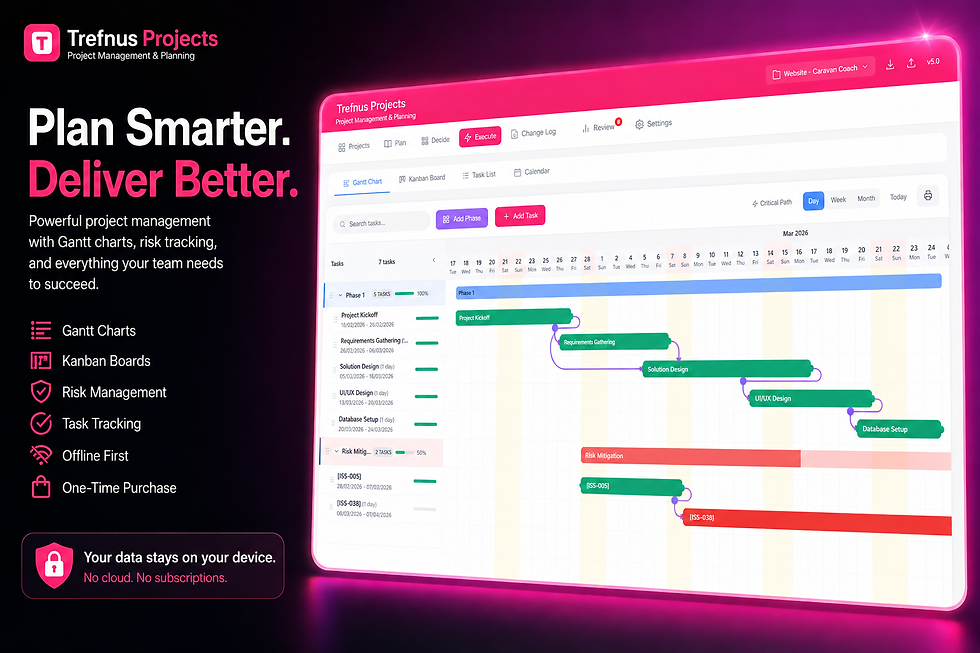
Trefnus Projects is a project management app built for exactly this purpose. Its built-in Gantt chart feature allows you to create drag-and-drop timelines with dependency links, critical path highlighting, and zoom levels covering days, weeks, and months. You can assign tasks to team members, set milestones, and export your Gantt chart for presentations or client reporting.
Alongside the Gantt chart, Trefnus Projects includes a Kanban board, task list, decision matrix, risk register, and project analytics, giving your team everything they need to plan, execute, and review projects from a single workspace. It works entirely in the browser with offline capability, so your data stays with you even without an internet connection.
Explore Trefnus Projects at:

What to look for in a Gantt chart tool • Drag-and-drop task editing and timeline adjustments • Dependency linking between tasks • Critical path highlighting • Team member assignment and workload visibility • Milestone tracking • Export and print options for sharing with stakeholders • Offline capability for use without internet access |
Conclusion
A Gantt chart is one of the most enduring and versatile tools in project management for good reason. It transforms a complex set of tasks and deadlines into a clear, visual timeline that any team member or stakeholder can understand. Whether you are running a small internal initiative or coordinating a multi-month programme, a Gantt chart helps you plan confidently, communicate clearly, and stay in control when things change.
The key to getting the most from a Gantt chart is keeping it up to date and treating it as a central reference point for your whole team. Combine it with strong task management and regular reviews, and you have a solid foundation for delivering projects on time and within budget.
If you are ready to bring more structure and visibility to your projects, exploring a dedicated project management tool with built-in Gantt chart functionality is a natural next step. Clear planning leads to better outcomes, and the right tools make that planning far easier to maintain.
Disclaimer
The information in this article is intended for general guidance only and does not constitute professional legal, financial, or regulatory advice. Always consult a qualified professional for advice specific to your circumstances.

