
How to Build Project Work Packages That Actually Get Delivered

Projects rarely fail because of a lack of ambition. They fail because the work is not defined clearly enough for people to act on it. Vague scopes, missed handoffs, and duplicated effort are all symptoms of the same root problem: poorly constructed project work packages.
Whether you are managing a construction project, a software rollout, or an operational change, understanding how to structure work packages correctly will save you time, money, and a considerable amount of frustration.
What Are Project Work Packages?
A project work package is the lowest level of a Work Breakdown Structure (WBS). It is a clearly defined unit of work that can be assigned, tracked, and completed independently.
Think of a work package as a container. Inside it, you will find everything a team member needs to do their job: the scope of the work, the expected output, the deadline, the resources required, and any dependencies on other parts of the project.
Work packages sit below summary tasks in your project hierarchy. A summary task might be "Launch marketing campaign." A work package beneath it would be something like "Design social media graphics for launch week," complete with an owner, a deadline, a budget, and defined acceptance criteria.
Why Work Packages Matter
Without well-structured work packages, project plans become high-level wish lists. People do not know what they are actually responsible for. Deadlines blur. Accountability disappears.
When work packages are built correctly, each team member knows exactly what they need to deliver, when it needs to be done, and what success looks like. This clarity is the foundation of every project that finishes on time and within scope.
The Key Elements of a Project Work Package
Every effective work package should contain the following components.
A clear title and unique identifier. Give each work package a name that describes the output, not the activity. "Website homepage wireframe approved" is more useful than "Do wireframe work."
Scope statement. Define what is included and, critically, what is not included. Scope creep starts when boundaries are left undefined.
Deliverable and acceptance criteria. What exactly must be produced, and how will you know it is complete? Vague deliverables lead to rework. Be specific about format, quality standard, and who signs it off.
Owner. One person is accountable for each work package. Not a team. Not a department. One named individual.
Start and end dates. Work packages must be time-bound. Without a deadline, they drift.
Effort and duration estimates. Effort is how many hours of work are required. Duration is how many calendar days it takes. These are not the same thing, and confusing them is a common planning mistake.
Dependencies. Note which work packages must be completed before this one can begin, and which work packages depend on this one being finished. Dependencies drive your project schedule and reveal the critical path.
Budget allocation. Even a rough cost estimate per work package helps you track spend against the plan before the project is over budget.
Resources required. People, equipment, software, third-party services. List what is needed so nothing is assumed.
How to Structure Work Packages: A Step-by-Step Approach
Step 1: Build Your Work Breakdown Structure First
You cannot create meaningful project work packages without first decomposing your project into a logical hierarchy. Start at the top with the overall project objective, then break it into major deliverables, then into summary tasks, and finally into work packages at the lowest level.
A common rule of thumb is the "8/80 rule": no work package should be smaller than 8 hours of effort or larger than 80 hours. If a work package exceeds 80 hours, break it down further. If it is under 8 hours, consider rolling it into a neighbouring package.
Step 2: Define the Output, Not the Process
Inexperienced project managers often write work packages that describe activities rather than deliverables. The difference matters enormously.
Activity-based (avoid) | Output-based (recommended) |
Meet with the client to discuss requirements. | Client requirements document reviewed and signed off. |
The second version gives you something tangible to measure progress against. Activities can be performed without producing anything useful. Deliverables cannot.
Step 3: Assign a Single Accountable Owner
Every work package needs one person responsible for its completion. This does not mean only one person does the work. It means one person is answerable if the work is not delivered.
Using a RACI framework alongside your work packages helps clarify who is Responsible, Accountable, Consulted, and Informed. This prevents the all-too-common situation where everyone assumed someone else would handle something.
Step 4: Sequence and Link Dependencies
Once your work packages are defined, map the dependencies between them. Some packages can run in parallel. Others must be completed in sequence.
Identifying these relationships allows you to build a realistic schedule and understand the critical path, which is the chain of dependent work packages that determines your earliest possible completion date.
Step 5: Validate With Your Team
Before you lock in the plan, review each work package with the person responsible for delivering it. Ask them: Is the scope clear? Is the estimate realistic? Do you have everything you need to start?
This conversation surfaces hidden risks and unrealistic assumptions before they become project problems.
Common Mistakes to Avoid
Confusing tasks with work packages. A task is a step within a work package. A work package is a complete unit of deliverable work. Do not collapse the two into one level.
Assigning work packages to groups. "The IT team" is not an owner. A named individual is.
Skipping acceptance criteria. Without defined criteria, "complete" means different things to different people. This is where disputes and rework originate.
Ignoring dependencies during planning. If two work packages are treated as independent when one actually relies on the other, your schedule will collapse as soon as one is delayed.
Over-decomposing the work. Breaking work down into two-hour tasks creates administrative overhead that slows your team down rather than helping them. Find the right level of granularity.
Using a Project Management Tool to Manage Work Packages
Building a detailed Work Breakdown Structure and managing dozens of inter-linked work packages manually is not sustainable beyond the simplest projects. A capable project management tool will do much of the heavy lifting for you.

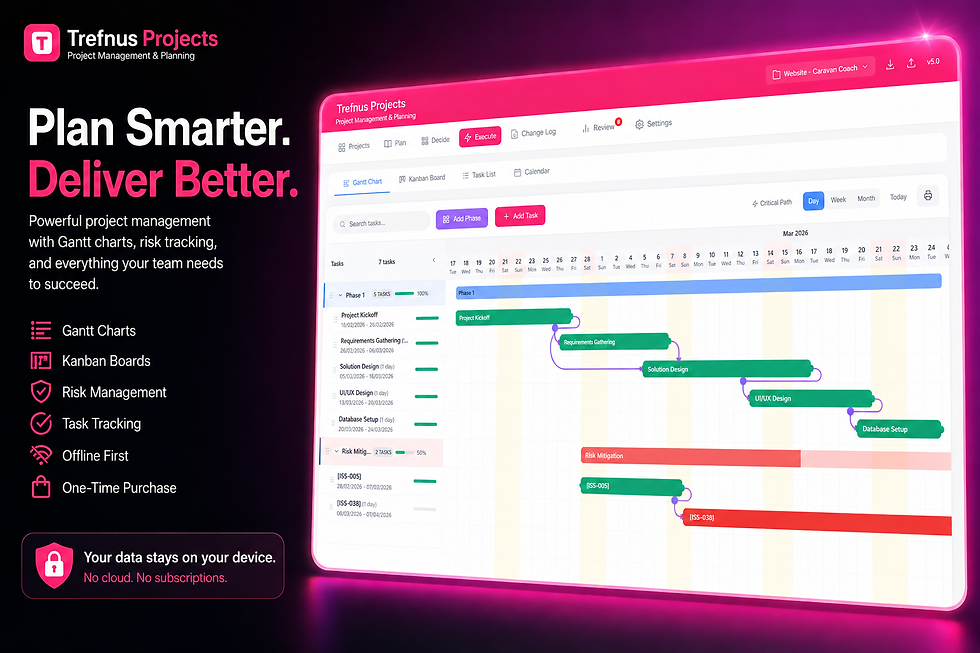
Trefnus Projects Trefnus Projects is designed specifically for this kind of structured project planning. Its Gantt chart view lets you map out work packages with start and end dates, link dependencies visually, and highlight the critical path so you always know where to focus your attention. Within each task, you can define the owner, attach relevant files, log estimates against actual time spent, set priority, and track status through a clear workflow. The Kanban board view then lets you manage execution in real time, moving work packages from Not Started through to Complete across a visual board. For teams working across multiple projects, the risk register and decision log tools help you capture the context behind project choices, so nothing is lost between planning and delivery. Because Trefnus Projects works entirely offline and stores data locally, your team can keep working without being dependent on an internet connection or a monthly subscription. It is a one-time purchase, designed to grow with your business rather than charge you indefinitely. Explore Trefnus Projects at: |

Putting It All Together
Project work packages are not bureaucratic paperwork. They are the mechanism through which a plan becomes action. When built correctly, they give your team the clarity to execute without constant hand-holding, and they give you the visibility to manage without micromanaging.
The process is straightforward: decompose the project into a clear hierarchy, define deliverables rather than activities, assign one accountable owner per package, map dependencies, and validate estimates with the people doing the work.
Get this right, and you will find that your projects run more smoothly, your teams are more confident, and your ability to predict outcomes improves dramatically.
If you are looking for a practical, structured way to plan and track project work packages without the complexity or ongoing cost of enterprise software, it is worth taking a closer look at what a well-designed project management tool can do for your planning process.
Disclaimer
The information in this article is intended for general guidance only and does not constitute professional legal, financial, or regulatory advice. Always consult a qualified professional for advice specific to your circumstances.


