
Critical Path Method: What It Is and How to Use It

Introduction
Every project has tasks that simply cannot be delayed without pushing back the finish date. Identifying those tasks is the entire point of the critical path method, one of the most reliable techniques in project management.
Whether you are coordinating a construction build, a product launch, or an operational change programme, understanding your critical path gives you clarity on where to focus your time and resources. Miss a task on the critical path and the whole project slips. Get it right, and you are in control.
This guide explains what the critical path method is, why it matters, and how to calculate it step by step.
What Is the Critical Path Method?
The critical path method (CPM) is a project scheduling technique used to identify the longest sequence of dependent tasks that must be completed on time for the project to finish by its deadline.
The "critical path" is that sequence. Any task sitting on it has zero float, meaning there is no room to delay it without affecting the project end date.
Tasks that sit outside the critical path have some degree of float (also called slack). These are tasks you can afford to delay slightly without impacting delivery, which gives you flexibility when resources are stretched.
A Brief History
CPM was developed in the late 1950s by engineers at DuPont and Remington Rand. It was originally created to improve the scheduling of chemical plant maintenance. Since then, it has become a cornerstone of project management across industries worldwide.
Why the Critical Path Method Matters
It Tells You Where Delays Will Actually Hurt
Not every delayed task is a crisis. The critical path method helps you distinguish between tasks that genuinely threaten your deadline and those that have room to breathe. This prevents unnecessary panic and helps you prioritise sensibly.
It Improves Resource Allocation
Once you know which tasks are critical, you can direct your best people and tightest budgets towards them. Non-critical tasks can be resourced more flexibly, without compromising the project.
It Supports Better Decision-Making
When a stakeholder asks for a scope change, or a supplier runs late, the critical path tells you immediately whether the impact is serious. That is the kind of visibility that builds trust with clients and senior management.
It Helps You Plan More Realistic Timelines
By mapping every task and its dependencies before work begins, you surface conflicts and bottlenecks early. This leads to more honest, achievable project schedules.
Key Terms to Understand Before You Calculate
Before working through the calculation, it helps to know a few terms:
Term | Definition |
Task (or Activity) | A unit of work with a defined duration |
Dependency | A relationship where one task cannot start until another is complete |
Float (or Slack) | The amount of time a task can be delayed without affecting the project end date |
Early Start (ES) | The earliest a task can begin |
Early Finish (EF) | The earliest a task can finish (ES + Duration) |
Late Start (LS) | The latest a task can start without delaying the project |
Late Finish (LF) | The latest a task can finish without delaying the project |
Total Float | LF minus EF (or LS minus ES). Zero float means the task is on the critical path. |
How to Calculate the Critical Path
Step 1: List All Project Tasks
Write out every task required to complete the project. Be as specific and complete as possible. Vague tasks lead to inaccurate scheduling.
Example project: Launching a new business website
• Define scope and requirements
• Agree on design direction
• Build website
• Write and load content
• Test the site
• Go live
Step 2: Identify Task Dependencies
For each task, ask: what must be finished before this can start? Some tasks can run in parallel. Others are strictly sequential. Mapping dependencies is where many project managers first discover hidden risks.
Using the website example:
• "Agree on design direction" depends on "Define scope and requirements"
• "Build website" depends on "Agree on design direction"
• "Write and load content" can start once design is agreed (runs in parallel with build)
• "Test the site" depends on both "Build website" and "Write and load content"
• "Go live" depends on "Test the site"
Step 3: Estimate Durations
Assign a realistic duration to each task in your chosen unit (days, weeks). Base this on historical data, team input, or informed estimates.
Task | Duration |
Define scope and requirements | 3 days |
Agree on design direction | 2 days |
Build website | 10 days |
Write and load content | 7 days |
Test the site | 3 days |
Go live | 1 day |
Step 4: Draw the Network Diagram
Map the tasks in sequence, showing how they connect. This is often called a precedence diagram or network diagram. Each task is a node, and arrows show dependencies.
For complex projects, this is where a Gantt chart tool becomes invaluable. It visualises the entire dependency chain at a glance, so you can spot the longest path without having to work it out manually on paper.
Step 5: Perform the Forward Pass
Work from left to right through your network to calculate Early Start (ES) and Early Finish (EF) for each task.
• ES of the first task = Day 0
• EF = ES + Duration
• ES of a subsequent task = EF of the task it depends on (if multiple predecessors, use the latest EF)
Task | ES | Duration | EF |
Define scope | 0 | 3 | 3 |
Agree design | 3 | 2 | 5 |
Build website | 5 | 10 | 15 |
Write content | 5 | 7 | 12 |
Test site | 15 | 3 | 18 |
Go live | 18 | 1 | 19 |
Project end date = Day 19 The forward pass tells you the earliest the project can finish, given all task durations and dependencies. |
Step 6: Perform the Backward Pass
Work right to left to calculate Late Start (LS) and Late Finish (LF) for each task. This tells you the latest each task can begin without delaying the project.
• LF of the last task = its EF (Day 19)
• LS = LF minus Duration
• LF of a preceding task = the earliest LS of the tasks that follow it
Task | LF | Duration | LS |
Go live | 19 | 1 | 18 |
Test site | 18 | 3 | 15 |
Build website | 15 | 10 | 5 |
Write content | 15 | 7 | 8 |
Agree design | 5 | 2 | 3 |
Define scope | 3 | 3 | 0 |
Step 7: Calculate Float and Identify the Critical Path
Float = LS minus ES (or LF minus EF). Tasks with zero float are on the critical path.
Task | ES | LS | Float | Critical? |
Define scope | 0 | 0 | 0 | Yes |
Agree design | 3 | 3 | 0 | Yes |
Build website | 5 | 5 | 0 | Yes |
Write content | 5 | 8 | 3 | No |
Test site | 15 | 15 | 0 | Yes |
Go live | 18 | 18 | 0 | Yes |
Critical Path: Define scope, Agree design, Build website, Test site, Go live Writing content has 3 days of float and can start up to 3 days late without affecting the project end date. |
Common Mistakes to Avoid
Ignoring Dependencies
Missing a dependency means your critical path calculation will be wrong from the start. Involve your whole team when mapping task relationships.
Using Overly Optimistic Durations
It is tempting to estimate the best-case scenario. Realistic durations, built with input from the people doing the work, produce far more accurate schedules.
Not Updating the Critical Path
As the project progresses, circumstances change. Tasks finish early or late, scope shifts, and new risks emerge. Recalculate your critical path regularly so it reflects reality, not just the original plan.
Assuming Only One Critical Path Exists
Some projects have multiple critical paths. If two sequences finish at the same time, both are critical. This increases risk because you have less flexibility across the board.
Using a Tool to Manage the Critical Path
For small projects with a handful of tasks, a spreadsheet or whiteboard may be enough. But as projects grow in complexity, managing dependencies, float, and durations manually becomes error-prone and time-consuming.
A dedicated project management tool with built-in Gantt chart functionality automates much of this work. It draws the network for you, highlights the critical path visually, and updates float calculations in real time as tasks are checked off or rescheduled.
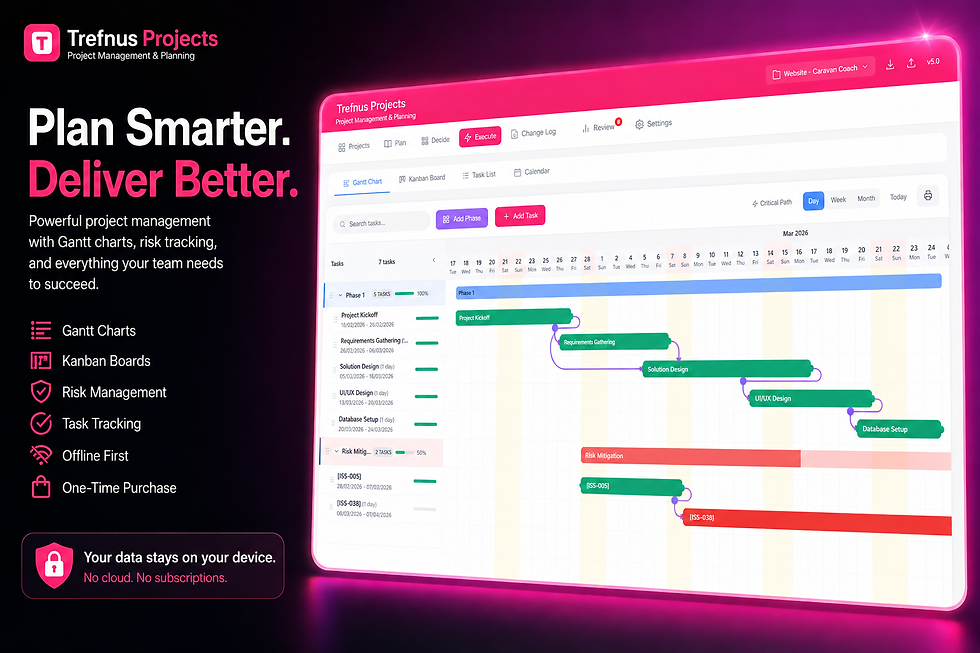
Trefnus Projects Trefnus Projects includes a drag-and-drop Gantt chart with dependency lines and critical path highlighting built in. You can see immediately which tasks sit on the critical path, adjust timelines without losing track of dependencies, and export your plan for client or stakeholder review. All of this works offline, with no cloud subscription or complex setup required. For project managers who want a structured, capable tool that handles the critical path without the overhead of enterprise software, it is a practical and affordable option. Explore Trefnus Projects at: |

Conclusion
The critical path method is one of the most powerful tools available to any project manager. It cuts through the noise of a busy project and tells you, clearly and precisely, which tasks you cannot afford to let slip.
By listing your tasks, mapping dependencies, estimating durations, and working through the forward and backward pass, you gain a level of scheduling clarity that most projects simply do not have. That clarity leads to better decisions, fewer surprises, and more projects delivered on time.
If you manage projects regularly, building the habit of identifying the critical path from day one is one of the most valuable things you can do. Pair that habit with a tool that visualises it automatically, and you will be in a stronger position than the majority of your competitors.
Disclaimer
The information in this article is intended for general guidance only and does not constitute professional legal, financial, or regulatory advice. Always consult a qualified professional for advice specific to your circumstances.


