
Excel Holiday Tracker vs Dedicated Leave Software: Which Is Right for Your Business?

Published: 27 June 2026 | Last reviewed: 27 June 2026
Almost every small business starts by tracking staff holiday in a spreadsheet. At first it works well enough, but as teams grow, annual leave calculations become more complicated, and multiple managers need access, that spreadsheet gradually becomes a hidden source of administrative mistakes.
An Excel holiday tracker costs nothing if you already have the software, and it can handle the basics for a small team. The problems tend to emerge quietly: an entitlement calculated incorrectly, a leave conflict nobody spotted, a file overwritten by a colleague. By the time those problems become visible, they often involve a frustrated employee or a gap in cover that is difficult to fill.
This article compares Excel holiday trackers with dedicated leave management software, covering the real costs, practical limitations, and the point at which switching makes sense for UK SMEs.
What Is an Excel Holiday Tracker?
An Excel holiday tracker is a spreadsheet, built in Microsoft Excel or a compatible tool such as Google Sheets, that records staff leave requests and entitlements. Typically it includes employee names, annual leave allowances, dates taken, and a running total of days remaining.
Templates are widely available online, ranging from basic annual leave logs to more advanced versions with conditional formatting, dropdown menus, and formula-driven calculations. Some businesses build their own from scratch, tailored to their specific rota patterns or absence types.
The appeal is obvious. If you already pay for Microsoft 365, there is no additional cost. Most managers are comfortable with Excel, and a basic holiday tracker can be set up in an afternoon.
What Excel Holiday Trackers Typically Include
• A list of employees with their annual leave entitlement
• Leave request dates, recorded manually
• A running total of days taken and remaining
• Colour coding to show leave periods at a glance
• Basic bank holiday adjustments for England, Scotland, Wales, or Northern Ireland
The Limitations of an Excel Holiday Tracker
For a business with a handful of employees and straightforward working patterns, a well-maintained spreadsheet can work perfectly well. The problems tend to emerge gradually, and often only become visible once something goes wrong.
Manual Errors and Version Control
Spreadsheets depend entirely on the accuracy of whoever is entering data. A formula overwritten by a colleague, a leave request entered in the wrong row, or a bank holiday missed from the calculation can all lead to incorrect entitlement figures. When multiple people have access to the file, version conflicts become a real risk.
In shared drives or email attachments, it is not uncommon for two managers to be working from different versions of the same file without realising it.
No Automatic Conflict Detection
An Excel tracker will not flag if two members of the same team have booked the same week off. A manager has to notice the overlap manually, and in busy periods that is easily missed.
Consider a five-person warehouse team where two forklift operators unknowingly book the same week off. The spreadsheet will not alert anyone. The problem may only surface when the rota is being prepared, leaving very little time to arrange cover. In a customer-facing or operationally critical team, that kind of gap can be difficult to recover from.
Limited Support for Complex Working Patterns
Part-time staff, job-share arrangements, and compressed working weeks all require pro-rata calculations that go well beyond a standard spreadsheet template. Getting these right manually takes time and carries risk. If a part-time employee works three days per week, their holiday entitlement needs to be calculated accordingly, factoring in which bank holidays fall on their working days.
No Audit Trail
A spreadsheet provides no record of who changed what and when. If a dispute arises about whether a leave request was approved, or whether a certain period of absence was recorded correctly, there is typically no reliable audit trail to refer back to.
Sickness and Absence Tracking
Most basic Excel trackers are designed for annual leave only. Tracking sickness absence, calculating Bradford Factor scores, or monitoring patterns of short-term absence requires either a separate sheet or significant custom formula work. Neither is ideal when managing absence management across a growing team.
Data Security and GDPR Considerations
Employee holiday and absence records contain personal data, which means they fall within the scope of UK GDPR. A spreadsheet stored in a shared drive or emailed between managers can be accessed, forwarded, or printed far more easily than most businesses realise. There is no built-in access control beyond folder-level permissions, and no log of who has viewed or modified the data.
Dedicated leave software typically provides role-based permissions, so employees see only their own records, managers see their own team, and administrators have appropriate oversight. Audit logging and encrypted storage are standard features that are difficult to replicate consistently with a shared spreadsheet.
Backups and Data Loss
Spreadsheets are vulnerable to accidental deletion, file corruption, and overwriting. If the master holiday tracker is deleted or saved over by mistake, recovering accurate records may be impossible. Cloud-based leave management tools back up data automatically, and file corruption simply is not a risk in the same way.
Scalability
A tracker built for a team of five often becomes noticeably harder to manage at fifteen, and many businesses begin to experience real administrative overhead as headcount continues to grow. Over time the spreadsheet can evolve into a complicated system that only one person fully understands, which creates its own risk when that person is on leave or leaves the business.
What Dedicated Leave Management Software Offers
Purpose-built leave management software is designed to handle all of the scenarios where a spreadsheet falls short. The best tools for UK SMEs cover annual leave, sickness, bank holidays, and absence monitoring within a single system.
Automated Leave Calculations
Entitlements are calculated automatically based on contract type, start date, and working pattern. Part-time and pro-rata calculations are handled by the system, reducing the chance of manual error. Bank holidays are pre-loaded for England, Scotland, Wales, and Northern Ireland, and applied according to where each employee is based.
Real-Time Conflict Detection
When a leave request is submitted, the software checks whether other team members are already booked off during the same period. Managers are alerted to potential conflicts before they approve the request, giving them the information they need to make an informed decision.
Manager Approval Workflows
Leave requests can be submitted by employees and approved or declined by line managers within the same system. This creates a clear record of every request and decision, without relying on email threads or verbal conversations that may not be properly logged.
Employee Self-Service
Many dedicated tools allow employees to submit their own leave requests, check their remaining entitlement, and view the team calendar directly. This removes a layer of administrative back-and-forth and gives employees visibility of their own records without needing to ask a manager. For HR teams and managers in smaller businesses, the time saving adds up quickly.
Mobile Access
Approving leave on a mobile phone using a shared spreadsheet is frustrating at best. Formatting breaks, formulas do not always behave correctly on mobile browsers, and updating the file from a phone introduces risk. Dedicated leave management software is typically designed to work cleanly on phones and tablets, which means managers can approve requests, check team availability, and monitor absences from wherever they are.
Sickness and Absence Monitoring
Many dedicated tools include Bradford Factor tracking, which assigns a score to each employee based on the frequency and duration of their absences. This is a widely used indicator of short-term absence patterns and can help managers identify where informal welfare conversations may be appropriate. The Bradford Factor is a management tool, not a disciplinary trigger, and should always be used in context.
Reporting and Dashboards
Rather than building pivot tables manually, dedicated software typically provides built-in dashboards showing leave trends, team availability, and absence rates across the organisation. This makes it much easier to spot patterns, plan for busy periods, and support HR decisions with data.
Access Controls and Audit Trail
Role-based access means employees can view their own records, managers can see their teams, and administrators have oversight of the whole organisation. Every action is logged, creating a reliable audit trail in the event of a dispute or a GDPR-related subject access request.
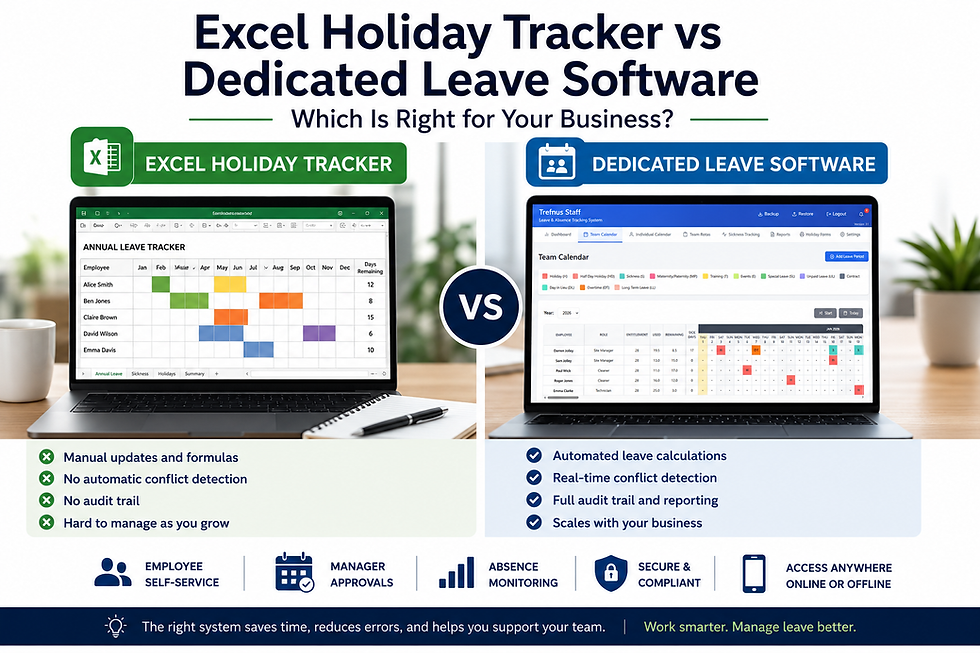
Excel Holiday Tracker vs Dedicated Leave Software: A Side-by-Side Comparison
The table below summarises the key differences between an Excel holiday tracker and dedicated leave management software across the features that matter most to UK SMEs.
Feature | Excel Holiday Tracker | Dedicated Leave Software |
Setup cost | Low (if you already have Excel) | Low to moderate (subscription or one-off licence) |
Setup time | Hours to days (manual build) | Quick (pre-configured templates) |
Holiday calculations | Manual formulas, error-prone | Automated, including part-time and pro-rata |
Leave conflict detection | None | Built-in, real-time alerts |
Bradford Factor | Requires custom formula work | Calculated automatically |
Manager approvals | Email or verbal, outside tool | Integrated approval workflows |
Employee self-service | No | Yes, employees can submit and view requests |
Mobile access | Limited, formatting often breaks on mobile | Yes, optimised for phone and tablet |
Audit trail | None or manual log | Automatic history and records |
Data security | Relies on file permissions, easy to share | Role-based access, encrypted storage |
Backup and recovery | Manual, risk of accidental loss | Automatic backups, no data loss on file corruption |
Multi-user access | Risk of version conflicts | Concurrent access with user roles |
Scalability | Often becomes unwieldy as headcount grows | Scales with your headcount |
Reporting | Manual charts or pivot tables | Built-in dashboards and reports |

Trefnus Staff Trefnus Staff is a purpose-built leave and absence management tool for UK SMEs. It handles holiday entitlements, Bradford Factor tracking, shift rotas, sickness categories, and automated conflict detection, all without a spreadsheet in sight. Find out more: |

When an Excel Holiday Tracker Is Probably Fine
Not every business needs to invest in dedicated software straight away.
An Excel tracker may still be the right choice if:
You have fewer than ten employees with straightforward, full-time working patterns
You have one person responsible for managing leave, with no risk of conflicting versions
Your absence types are limited to annual leave and occasional sickness
You are comfortable building and maintaining your own formulas
Budget is genuinely constrained and a simple system covers your current needs
The key word here is currently. A tracker that works well today may become a liability as your team grows or your working arrangements become more varied.
When It Is Time to Switch to Dedicated Leave Software
Most businesses reach a tipping point where the time spent maintaining their spreadsheet, and the risk of errors, outweighs the cost of a proper tool.
Common triggers include:
Team size has grown beyond ten or fifteen people
You are managing multiple part-time or variable-hours employees
Leave disputes have arisen that were difficult to resolve without a clear record
Managers are spending significant time each week maintaining the tracker manually
You want to track sickness absence alongside annual leave
Mobile approvals have become a regular need and the spreadsheet is awkward to use on a phone
You are approaching a period of growth and want to build better processes before you need them
For many SMEs, the subscription cost is often outweighed by the administrative time saved within the first few months of switching.
What to Look for in Leave Management Software for UK SMEs
If you are evaluating dedicated leave management tools, the following features are worth prioritising for a UK context:
Automatic bank holiday management for England, Scotland, Wales, and Northern Ireland
Support for part-time and variable working patterns with pro-rata calculations
Bradford Factor tracking for sickness absence monitoring
Manager approval workflows and employee self-service
Clear audit trail and leave history per employee
Role-based access controls and GDPR-compliant data handling
Simple reporting without the need to build your own charts
Offline capability, so managers can access records without depending on an internet connection
UK-specific compliance, including statutory holiday entitlement under the Working Time Regulations 1998
Frequently Asked Questions
Is an Excel holiday tracker good enough for a small business?
For a very small team with simple, full-time working patterns, an Excel holiday tracker can be sufficient. It is free, familiar, and quick to set up. The limitations become more significant as headcount grows, working patterns become more varied, or when the business needs to track sickness absence alongside annual leave. If you have more than ten employees, or you are spending a meaningful amount of time each month maintaining your spreadsheet, it is worth evaluating dedicated leave management software.
Can I use Google Sheets instead of Excel as a holiday tracker?
Yes, and many small businesses do. Google Sheets offers the advantage of real-time collaboration without version conflicts, which addresses one of the more common frustrations with Excel. Multiple managers can edit the same sheet simultaneously, and changes are saved automatically.
However, Google Sheets shares most of the fundamental limitations of any spreadsheet-based approach: there is still no automated conflict detection, no built-in approval workflow, no Bradford Factor tracking, and entitlement calculations for part-time staff still need to be built and maintained manually. It is a step up from a locally saved Excel file, but it is not a substitute for dedicated leave management software as your team grows.
Is leave management software worth it for fewer than ten employees?
It depends on your circumstances. For a team of under ten with uniform, full-time contracts and a single person managing leave, a well-maintained spreadsheet may be perfectly adequate.
However, if your team includes part-time staff, if sickness absence needs to be tracked, or if mobile approvals are a regular requirement, dedicated software can save time and reduce errors even at small headcounts. Many tools are priced affordably for small teams, so the cost barrier is lower than it might appear. It is worth trialling an option before dismissing it on the basis of team size alone.
What are the risks of using Excel to track staff holiday?
The main risks are manual errors in leave calculations, version conflicts when multiple people access the file, no automatic detection of booking conflicts, and the absence of an audit trail if a dispute arises.
Pro-rata calculations for part-time staff are also prone to error when done manually. There are also data security considerations: a spreadsheet shared by email or stored in an uncontrolled folder may be accessed by people who should not have visibility of colleagues' personal records, which has implications under UK GDPR.
How does dedicated leave software calculate holiday entitlement?
Dedicated leave management software calculates holiday entitlement automatically based on each employee's contract type, working pattern, and start date. For part-time employees, it applies pro-rata calculations so that entitlement reflects the number of days worked per week.
Bank holidays are pre-loaded for each region of the UK and applied according to where each employee works. Under the Working Time Regulations 1998, full-time employees are entitled to a minimum of 5.6 weeks of paid leave per year, and good software ensures this statutory minimum is reflected correctly in every employee record.
What is the Bradford Factor and does leave management software track it?
The Bradford Factor is a formula used by HR teams and managers to measure the impact of short-term, frequent absences on a business. It assigns a numerical score to each employee based on the number of separate absences and the total number of days lost. A higher score indicates a pattern of frequent short absences rather than a single extended period of leave.
Most dedicated absence management tools calculate Bradford Factor scores automatically, updated in real time as new sickness records are added. It is widely used as one indicator among several when identifying where welfare conversations or absence reviews may be appropriate. It is not intended as a disciplinary tool and should always be considered alongside context.
Can I switch from Excel to leave management software without losing data?
Most dedicated leave management tools allow you to import employee records, entitlements, and existing absence history either via a CSV import or a structured data template. The migration process is typically straightforward for a small team. Before switching, it is worth cleaning up your spreadsheet data, ensuring leave balances are accurate and absence records are complete, so that your new system starts with reliable information. Many providers offer onboarding support to help with this process.
Do I need internet access to use leave management software?
This depends on the tool. Cloud-based leave software requires an internet connection to access and update records, which can be a limitation for managers working in areas with unreliable connectivity. Some tools, including certain progressive web apps designed for SMEs, are built with offline-first capability, meaning managers can view and update records without an active connection. Data syncs automatically when connectivity is restored. If reliable offline access is important to your business, it is worth confirming this capability before committing to a tool.
Further Reading and Official Guidance
GOV.UK: Holiday Entitlement Rights: www.gov.uk/holiday-entitlement-rights
GOV.UK: Calculate Your Statutory Holiday Entitlement: www.gov.uk/calculate-your-holiday-entitlement
Acas: Holiday Entitlement Guidance: www.acas.org.uk/holiday-entitlement
Acas: Managing Sickness Absence: www.acas.org.uk/managing-sickness-absence
CIPD: Absence Management Guide: www.cipd.org/knowledge/fundamentals/relations/absence/absence-management-guide
ICO: UK GDPR Guidance: www.ico.org.uk/for-organisations/guide-to-data-protection
Conclusion
An Excel holiday tracker is a perfectly reasonable starting point for a small business. It costs nothing if you already have the software, requires no onboarding, and gives you basic visibility of who is off and when. For a team of fewer than ten people with simple working patterns, it may be all you need.
But the limitations are real. Errors accumulate gradually, conflict detection relies on a manager noticing overlaps, mobile approvals are awkward, and tracking sickness alongside annual leave becomes a significant overhead. As teams grow and working arrangements become more varied, the spreadsheet can evolve into a complicated system that only one person fully understands.
Dedicated leave management software removes those risks. Entitlements are calculated automatically, leave conflicts are flagged before they cause problems, employees can submit their own requests, and every approval is recorded in a single system. For many SMEs, the subscription cost is often outweighed by the administrative time saved.
If your spreadsheet is starting to feel like a liability rather than a tool, it may be time to explore what a purpose-built solution can offer. Trefnus Staff is designed for UK SMEs looking to move beyond the spreadsheet and manage leave, sickness, and absence in one place.
Disclaimer The information in this article is intended for general guidance only and does not constitute professional legal, financial, or regulatory advice. Always consult a qualified professional for advice specific to your circumstances.


